If you use Claude Code, you’ve probably noticed it forgets everything between sessions. You tell it your test command on Monday, and by Tuesday it’s guessing again.
A CLAUDE.md file fixes that. It’s a plain text file in your project that Claude reads every time it starts, like a note on the fridge that says “here’s how we do things here.” The catch is that how you write it matters. A short, clear file gets followed. A long, vague one gets ignored.
In this guide, you’ll learn where the file goes, 10 best practices with simple examples, and a template you can copy.
What is a CLAUDE.md file (and where does it go)
A CLAUDE.md file is a markdown file of standing instructions for Claude Code. Claude loads it into context when a session starts, so you don’t have to repeat yourself. You can have more than one, and each location has a different reach.
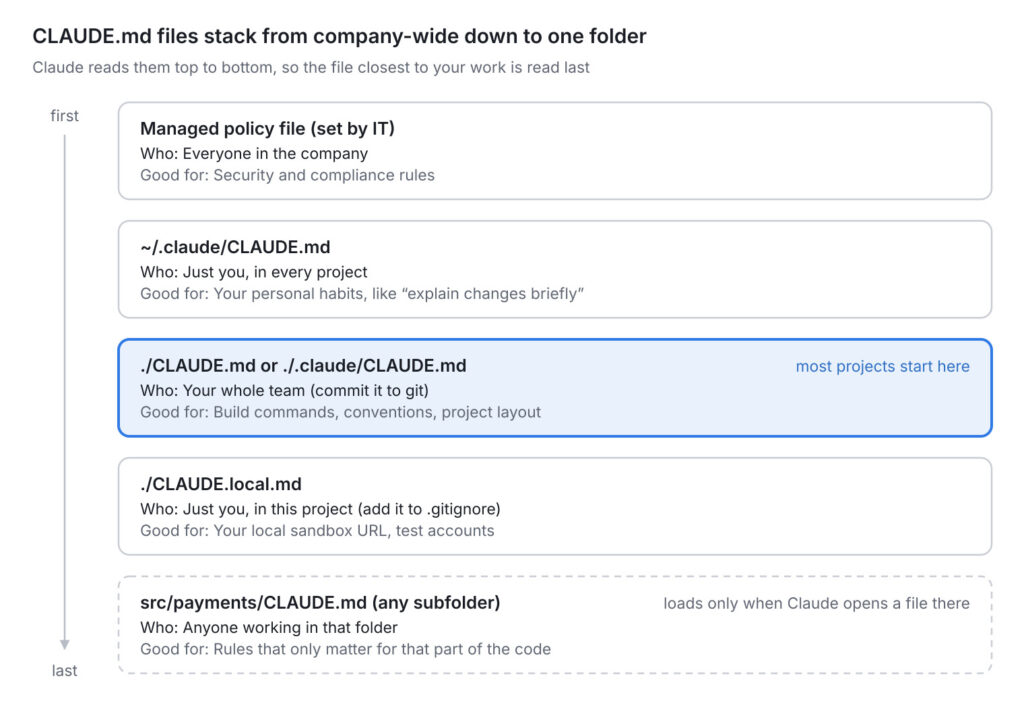
A few things about loading that trip people up:
- Files stack, they don’t replace each other. Claude reads the files from the folders above where you started it, top to bottom. The file closest to your working folder is read last.
- Subfolder files load later. A
CLAUDE.mdinsidesrc/payments/only loads when Claude actually opens a file in that folder. That’s a feature: it keeps unrelated rules out of the way. - Already using AGENTS.md? Recent versions of Claude Code read
AGENTS.mdwhen there’s noCLAUDE.mdin the project. If you have both, put@AGENTS.mdat the top of your CLAUDE.md so every tool shares one source of truth.
The quickest way to start is to run /init inside Claude Code. It scans your codebase and drafts a CLAUDE.md for you. Treat that draft as a first pass, not the finished file. The practices below are how you turn it into something useful.
10 CLAUDE.md best practices
1. Keep it under 200 lines
Anthropic’s own guidance is to aim for under 200 lines per file. Every line costs context, and a long file makes Claude follow each rule less reliably. Think of it like a briefing for a new hire on day one. Nobody remembers a 40-page handbook. Everyone remembers a one-page cheat sheet.
A handy trick: notes meant only for humans can go inside HTML comments like <!-- why we added this rule -->. Claude Code strips them before loading the file, so they cost nothing.
2. Write rules you could check
If you can’t tell whether Claude followed a rule, Claude can’t either.
Before:
- Format code properly
- Test your changes
- Keep files organized
After:
- Use 2-space indentation
- Run `pnpm test:unit` before saying a task is done
- API handlers live in `src/api/handlers/`
The first version sounds wise and changes nothing. The second one is boring, and it works.
3. Only write what Claude can’t figure out
Claude can read your package.json and your folder tree. It doesn’t need you to repeat them. What it can’t see is the stuff that lives in your team’s heads.
Skip this:
- This is a React app
- We use TypeScript
- src/ contains the source code
Write this instead:
- Never edit files in `src/generated/`. Run `pnpm codegen` to rebuild them.
- The staging database is shared. Don't run migrations against it.
A simple test for every line: would Claude get this wrong without it? If not, cut it.
4. Give the reason, not just the rule
A rule with a reason helps Claude handle the cases you didn’t predict.
# Weak
- Don't use Date.now() in tests

# Strong
- Don't use Date.now() in tests. Tests run on a frozen clock,
  so use `testClock.now()` or the test will pass locally and fail in CI.
Now if Claude meets new Date() in a test, it knows that’s the same problem, even though you never mentioned it.
5. Add a rule the second time you repeat yourself
Don’t try to write the perfect file on day one. Start small and grow it from real friction. My rule: the second time I type the same correction into chat, it goes into CLAUDE.md. Anthropic’s docs suggest the same trigger, along with things a code review keeps catching.
When you want something saved there, say it plainly: “add this to CLAUDE.md.” If you just say “remember this,” Claude Code usually saves it to its own auto memory instead, which isn’t shared with your team.
6. Use headings and short bullets
Claude follows organized sections better than dense paragraphs. Group related rules under clear headings like Commands, Code style, Testing, and Gotchas. One rule per bullet. If a bullet needs three sentences, it probably belongs in its own file (see tip 8).
7. Say what to do, not only what not to do
“Don’t” on its own leaves Claude guessing what you want instead.
# Leaves a gap
- Don't use axios

# Closes the gap
- Use the `apiClient` wrapper in `src/lib/api.ts` for HTTP calls, not axios.
  It adds auth headers and retries.
8. Split big projects into smaller, scoped files
If your file keeps growing, don’t cram. Move rules that only matter for one area into .claude/rules/. You can tell a rule to load only for certain files using a paths header:
---
paths:
  - "src/api/**/*.ts"
---

# API rules
- Validate every request body with zod
- Return errors in the `{ error: { code, message } }` format
This rule stays out of the way while Claude works on your CSS. It only shows up when Claude touches an API file. You can get a similar effect by dropping a CLAUDE.md into a subfolder.
One catch: @path imports help you organize, but they don’t save space. Imported files load together with the CLAUDE.md that imports them.
9. Keep personal preferences out of the team file
Your project CLAUDE.md is shared through git, so treat it like code. Your local database URL or “I like verbose explanations” don’t belong there.
- Personal, all projects:
~/.claude/CLAUDE.md - Personal, this project only:
CLAUDE.local.md(and add it to.gitignore)
10. Know what CLAUDE.md can’t do
CLAUDE.md is guidance, not a lock. Claude reads it and tries hard to follow it, but there’s no guarantee. If something must happen every single time, like running the linter after each edit or never touching .env, use a hook or a permission setting instead. Those run no matter what Claude decides.
And review the file every few weeks. Delete rules about code that no longer exists, and fix rules that contradict each other. When two rules conflict, Claude may pick either one. Running /context in a session shows which memory files actually loaded, which is the first thing to check when Claude seems to ignore you.
A CLAUDE.md template you can copy
Here’s a complete example for a typical web app. It’s about 35 lines, and every line is something Claude couldn’t work out alone. Swap in your own commands and gotchas.
# Acme Dashboard

Next.js app for customer billing. Backend lives in a separate repo.

## Commands
- Install: `pnpm install`
- Dev server: `pnpm dev` (runs on port 4000, not 3000)
- Unit tests: `pnpm test:unit` (run before saying a task is done)
- Lint and types: `pnpm check`

## Code style
- Use named exports, not default exports
- Server code goes in `src/server/`, never import it from client components
- Use the `apiClient` in `src/lib/api.ts` for HTTP calls. It handles auth and retries.

## Testing
- Use `testClock.now()` instead of `Date.now()`. Tests run on a frozen clock.
- Mock the payment provider with `mockStripe()`. Never hit the real API in tests.

## Gotchas
- Don't edit `src/generated/`. Run `pnpm codegen` to rebuild it.
- Money is stored in cents as integers. Never use floats for amounts.
- The staging database is shared with QA. Ask before running migrations.

## Workflow
- Branch names: `feat/short-name` or `fix/short-name`
- Keep pull requests under 400 changed lines when you can

## More detail
- API conventions: @docs/api-conventions.md
Notice what’s missing: no “write clean code,” no folder tree, no list of every dependency. Claude already knows those things or can look them up in seconds.
How to check that your CLAUDE.md is loaded
Before you blame Claude for ignoring your rules, make sure it can actually see them. It takes 10 seconds.
- Start Claude Code from your project folder.
- Type
/contextand press Enter. - Look for the Memory files line. It shows how many instruction files loaded and how many tokens they use.
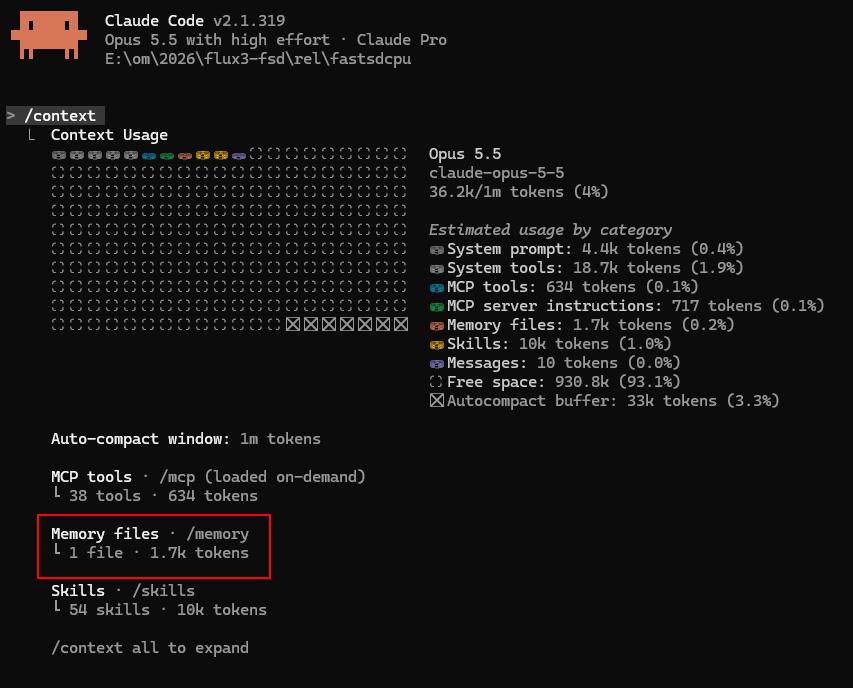
From the screenshot we can see that memory files 1 file (1.7k tokens) loaded it is our CLAUDE.md file.
Common CLAUDE.md mistakes to avoid
Most broken CLAUDE.md files fail in one of these six ways. If Claude seems to ignore your file, check this list first.
- Treating it like a README. A README explains the project to humans who skim. CLAUDE.md is read in full by Claude every session, so every line has to earn its place.
- Copying a giant template from the internet. A 500-line “ultimate CLAUDE.md” built for someone else’s project will bury the three rules that matter for yours.
- Vague advice. “Follow best practices” and “write maintainable code” are things Claude already tries to do. They take up space and change nothing.
- Rules that fight each other. “Always add tests” in one file and “skip tests for quick fixes” in another. Claude has to pick, and it may not pick the one you meant.
- Never updating it. A rule pointing at a file you deleted six months ago confuses Claude more than having no rule at all.
- Using it as a security guard. “Never delete production data” in CLAUDE.md is a polite request. A permission rule or hook is an actual wall.
CLAUDE.md FAQ
How long should a CLAUDE.md file be?
Under 200 lines per file. Anthropic recommends this because longer files use more context and Claude follows them less reliably. Most good project files I’ve seen land between 30 and 120 lines.
What should I put in CLAUDE.md?
Build and test commands, coding conventions that differ from the defaults, where key code lives, and project-specific gotchas. Leave out anything Claude can read from the code itself, like your folder structure or dependency list.
Why does Claude ignore my CLAUDE.md?
Usually the file is too long, the rules are too vague, or two rules contradict each other. Run /context to confirm the file loaded, then make each rule specific enough to check. For rules that must never be broken, use a hook instead.
What’s the difference between CLAUDE.md and CLAUDE.local.md?
CLAUDE.md is shared with your team through git. CLAUDE.local.md is for your personal notes on one project, and you add it to .gitignore so it stays on your machine.
Can I use AGENTS.md instead of CLAUDE.md?
Yes. Recent versions of Claude Code read AGENTS.md when a project has no CLAUDE.md. If you keep both, add @AGENTS.md at the top of your CLAUDE.md so the shared rules load once.
Should I commit CLAUDE.md to git?
Yes, commit the project file so the whole team gets the same instructions. Review changes to it in pull requests the same way you review code
Conclusion
You don’t need a perfect CLAUDE.md today. Run /init, delete anything Claude could figure out on its own, and keep the commands and gotchas. Then add one line every time you catch yourself repeating a correction.
In a month, you’ll have a short file that makes Claude feel like it actually knows your project. That’s worth more than any clever prompt. Spec driven development best practices .