In this article we will understand the concept of AI agent skills. AI agents are evolving rapidly. From simple prompt based bots to autonomous systems that can search, reason, and execute tools, the architecture behind modern agents is becoming more structured.
Agent Skills
The open Agent Skills standard was introduced by Anthropic. Agent skill is a modular add-on that gives AI agents new abilities, from coding best practices to video editing. Skills are a new open standard for packaging reusable expertise into modular units that any compatible AI agent can discover, load, and apply on demand. Think of them as plugins for your agent’s brain: instead of repeating the same long prompt every time you want your AI to follow your team’s React conventions or generate a proper Dockerfile, you install a skill once and the agent applies it automatically whenever relevant.
Skill Folder Structure
At its core, a skill is simply a directory that contains a SKILL.md file. This file holds essential metadata such as the skill’s name and description along with detailed instructions that guide an agent in completing a specific task.
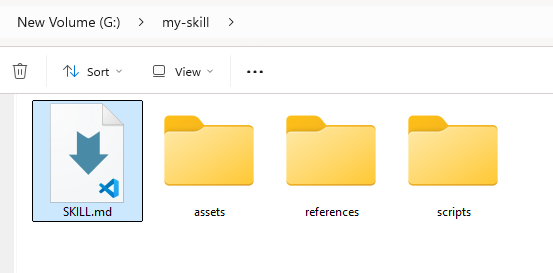
my-skill/
├── SKILL.md          # Required: instructions + metadata
├── scripts/          # Optional: executable code
├── references/       # Optional: documentation
└── assets/           # Optional: templates, resources
Agent Skills Format
A skill is a directory containing atleast one file called SKILL.md. Optional directories such as scripts/, references/, and assets/ can be added to provide extra functionality and resources for your skill.
SKILL.md file
The SKILL.md file must begin with YAML frontmatter (Frontmatter refers to the introductory section of a document or publication that contains information about the content), followed by the main content written in Markdown.
---
name: skill-name
description: A description of what this skill does and when to use it.
---
The name and description fields are necessary other optional fields includes allowed-tools, metadata,license.
- name – Lowercase letters, numbers, and hyphens only(Max 64 characters) E.g name: code-review
- description – Clear description of what the skill does and when to use it( max 1024 characters)
- license(optional) – The license applied to the skill, e.g – license: Proprietary. LICENSE.txt has complete terms
- allowed-tools(optional) – The space limited allowed tools to use e.g : allowed-tools: Read, Grep
- metadata(optional) – Additional data as key value pair
- compatibility (Optional) – Whether this skill is intended for a particular environment e.g : compatibility: Designed for Claude Code (or similar products)
Finally we have skill body it contains skill instructions. It should have following recommended sections
- Step-by-step instructions
- Examples of inputs and outputs
- Common edge cases
Here is a simple example of SKILL.md file.
---
name : Weather Retriever
description: Fetches real-time weather data and forecasts for any city globally. Use this when the user asks about current conditions or travel planning.
---

## Instructions
1. Extract the `city_name` and `units` (metric/imperial) from the user prompt.
2. If the city is missing, ask for clarification before proceeding.
3. Call the `get_weather_data` function using the extracted parameters.
4. Format the output into a friendly, 2-line summary for the user.

## Tools & Resources
- **Code:** `weather_api_client.py`
- **Data:** `city_codes.json` (for validation)

## Constraints
- Do not provide forecasts beyond 7 days.
- Always include the "Last Updated" timestamp in the response.
Optional directories
- scripts/ – contains executable code that agents can run to perform actions or computations. (Python,Javascript or bash)
- references/ – holds extra documentation and reference files that the agent can read on demand. for example REFERENCE.md for detailed reference
- assets/ – stores static resources like templates, images, or data files used by the skill
How Agent Skills Work
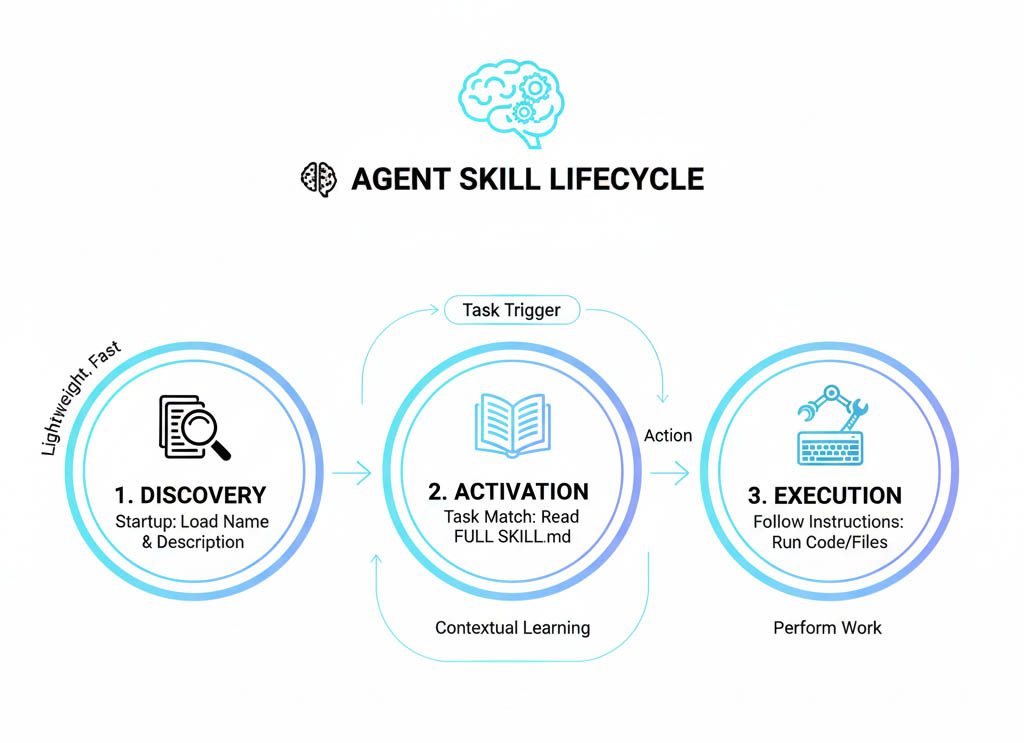
Agent skills has following life cycle :
- Discovery – The agent scans available skills and reads their names and descriptions to understand what capabilities are available.
- Activation – When a task matches a skill’s purpose, the agent loads and reads the full SKILL.md instructions.
- Execution – The agent follows the skill’s instructions, using any scripts, assets, or references required to complete the task.
You can refer the Skills by Anthropic on this GitHub repo.
MCP vs Agent Skills
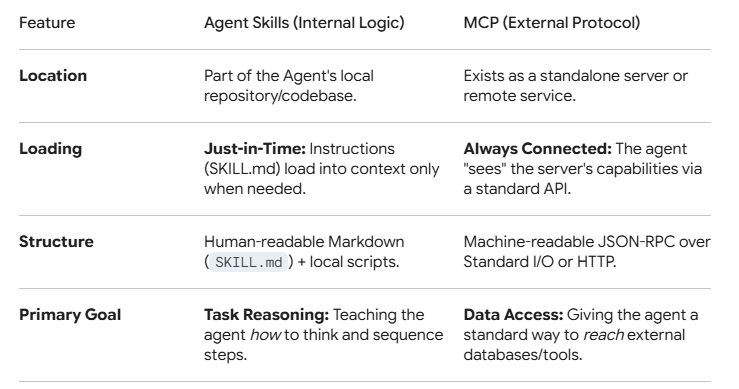
The key differences between MCP(Model context proctocol) and agent skills are listed below.
Best Practices with Agent skills
Follow these best practices to work with agent skills :
- Create a dedicated folder per skill (e.g.,
pdf-parsing/) inside askills/directory - Define “When to use” and “How to use” sections in
SKILL.mdwith clear steps, parameters, and examples. - Keep SKILL.md within 500 lines. If it goes beyond that, evaluate whether some sections should be moved into separate reference files.
- If you are using third party skills , enusre that it does not contains any malicious instructions/code.
When to use Agent Skills
Use agent skills in the following scenarios :
- When tasks are reusable (E.g Web research skill, blog outline generator skill)
- When You want separation between “Brain” and “Tools”, think like this LLM as brain(reasoning) and skills as hands(execution),If your system only needs thinking then no skill needed, if your system needs doing then skills are required
- Avoid skills for one-off tasks (use prompts) or real-time external access (use MCP/tools).
Security Risks
The following secuirty risks are associated with third party agent skills :
- Malicious Code Injection : Third-party skills often bundle executable instructions or scripts (e.g., hidden curl commands in markdown) that AI agents execute blindly, enabling data exfiltration, backdoors, or system compromise without human review
- Privilege Escalation : Skills frequently request excessive permissions—like sudo access, credential stores, or root execution far beyond stated needs, amplifying damage if exploited.
OpenClaw and VirusTotal are now collaborating to scan ClawHub, the marketplace for agent skills. You can also use Skill Scanner by Cisco for free.
skill-scanner scan <skill folder path>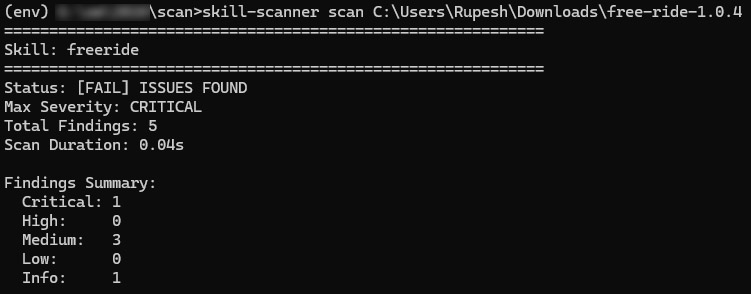
Conclusion
Agent Skills are transforming how AI agents move from simple chatbots to capable task executors. By packaging instructions, tools, and structured workflows into reusable skill modules, you can build agents that are scalable, maintainable, and easier to extend.