In this article we will discuss how to pull and run Gen AI models using Docker Model Runner(DMR).
Docker Model Runner (DMR)
Docker Model Runner (DMR) is a tool built into Docker Desktop and Docker Engine that makes it easy to pull, run, and serve AI/LLM models locally directly from Docker Hub, any OCI-compliant registry, or Hugging Face. Models can be pulled from model resgistry and stored locally.
DMR has the following key features :
- Serves models via OpenAI and Ollama-compatible APIs, so existing apps can plug right in Docker
- Models load into memory only at runtime and unload when not in use to save resources Docker
- Following inference engines are supported
- Image generation via diffusers
- Integrates with AI coding tools like Cline, Continue, Cursor, and Aider Docker
- Works with Docker Compose and Testcontainers
Step 1: Enable Docker Model Runner
First we need to install docker desktop/ docker by following the getting started docker guide. To enable docker model runner do the following.
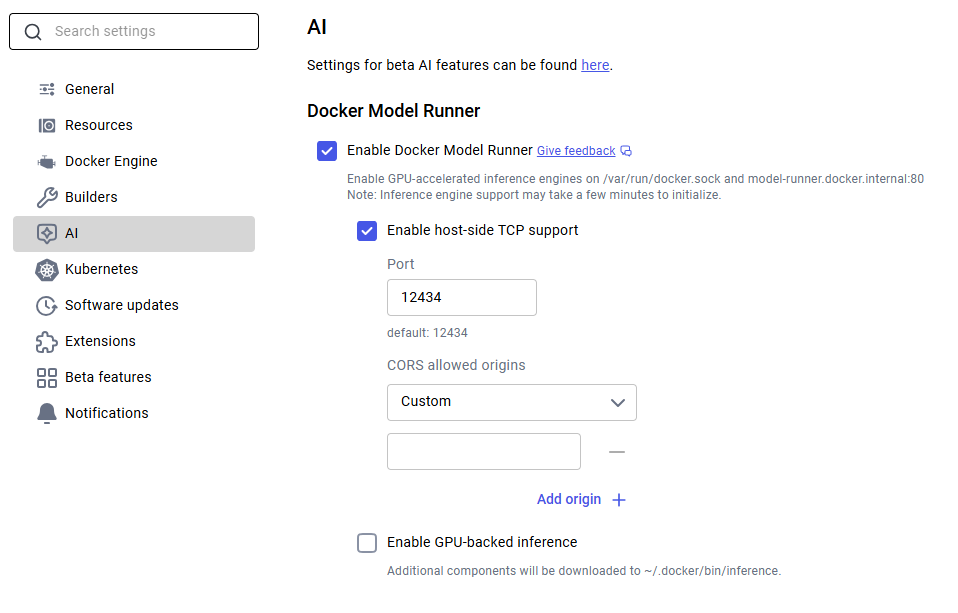
Docker Desktop: Go to Settings -> AI tab, then enable Docker Model Runner. Optionally enable GPU-backed inference if you have a supported NVIDIA GPU.
Docker Engine (Linux): Install the plugin, then test it:
sudo apt-get update
sudo apt-get install docker-model-plugin
Now we can verify docker model command by running the below command
docker model version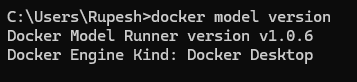
Step 2: Pull a Model
Next we need to pull a model from Docker Hub.
docker model pull ai/smollm2:360M-Q4_K_MOr pull directly from HuggingFace:
docker model pull hf.co/bartowski/Llama-3.2-1B-Instruct-GGUFModels are cached locally after the first pull.
Docker models can be installed using docker desktop as shown below
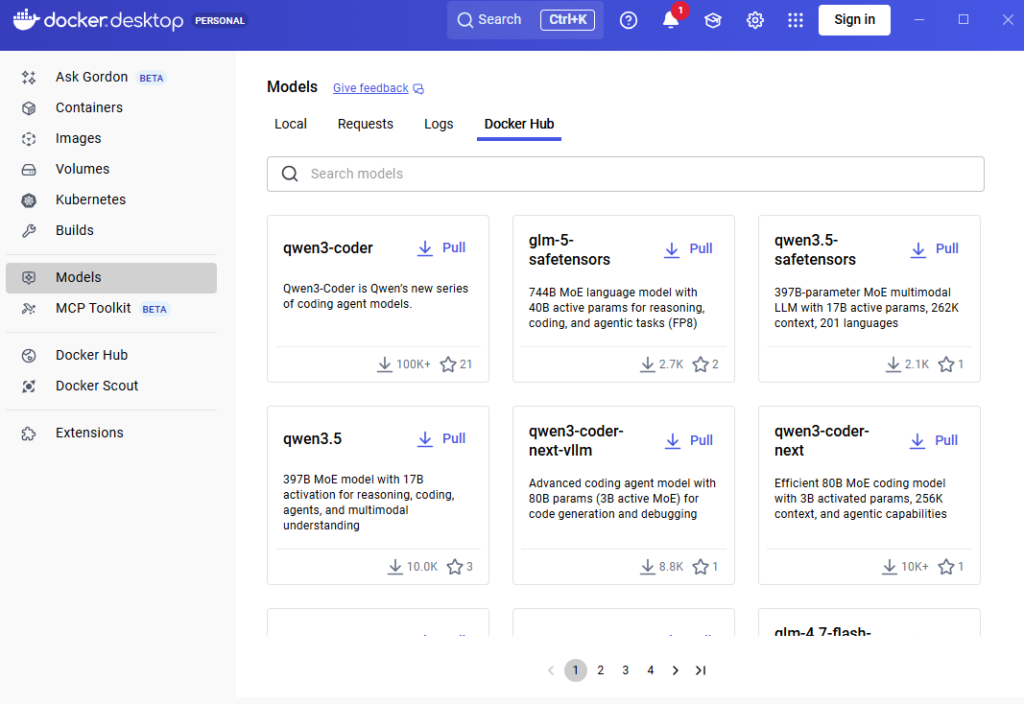
Step 3: Run the Model
Run the below command to run the model with interactive CLI :
docker model run ai/smollm2:360M-Q4_K_M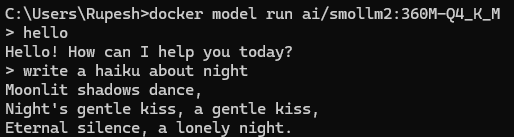
How to use Model API
By default, Docker Model Runner may only be accessible via a Unix socket or internal Docker networking. To call it from your host machine (e.g., via curl or Postman), you must explicitly enable TCP host access. As we have enabled this in the docker desktop we can use the API.
For docker CLI use the below command enable it
docker desktop enable model-runner --tcp=12434Docker Model Runner uses an OpenAI-compatible API, but the path includes the engine and model name. Base URL structure:
- From Host:
http://localhost:12434/v1 - From inside a Container:
http://model-runner.docker.internal:12434/v1
Testing the API with Postman.
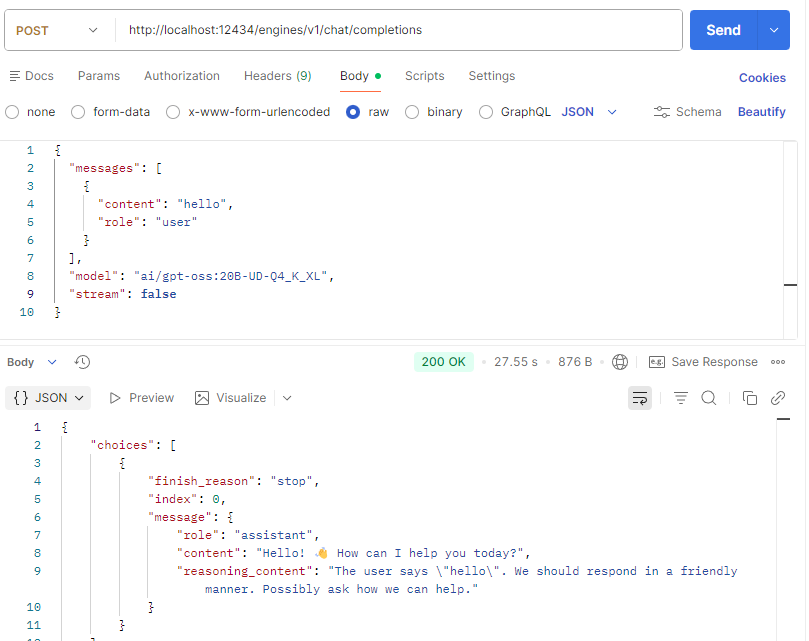
We can connect with OpenAI comptible libraries, here is an example of Python code :
from openai import OpenAI

client = OpenAI(
    base_url="http://localhost:12434/engines/v1",
    api_key="not-needed",
)

response = client.chat.completions.create(
    model="ai/smollm2:360M-Q4_K_M", messages=[{"role": "user", "content": "Hello!"}]
)
print(response.choices[0].message.content)
Context Size
The context size is the total token budget for each request, split between what you send in and what the model generates back. As per DMR documentation default context size for the engines :
- llama.cpp – 4096
- vLLM – Uses the model’s maximum trained context size
We can configure the model context size using the below command :
docker model configure --context-size 8192 ai/qwen2.5-coderWhen to Use Docker Model Runner
Use docker model runner in the following scenarios.
- Local development & testing – Local development without costly API calls, or privacy concerns from cloud APIs.
- Privacy-sensitive workloads – To keep confidential data fully under your control.
- Docker-native workflows – Use familiar
docker model pull/runcommands with no new toolchain to learn. - Multi-container AI apps with Compose – Define models directly in
compose.ymlalongside your app services with zero extra glue code. - Offline / edge environments – Run models locally where cloud API access isn’t reliable or allowed.
- CI/CD pipelines – Pull, tag, version, and deploy models like any other artifact, no GPU cluster required
Quick Troubleshooting
1. To check whether Docker Model Runner (DMR) run the below command :
docker model status2. To list pulled models use the below command :
docker model ls3. To display detailed information about a specific model
docker model inspect <model_name>E.g docker model inspect ai/smollm2:360M-Q4_K_M
4. Test basic connectivity (List Models):
curl http://localhost:12434/v1/modelsConclusion
Docker model runner makes it easier to run AI models locally without much problem and staying with the docker ecosystem. Run Large Language Models Locally with Simple APIs.