Picture this. You ask an AI coding agent to “add a password reset feature.” Ten minutes later you have 600 lines of code. It sends reset links that never expire. It emails the user’s old password in plain text. It even adds a new database table you never asked for.
The agent did not fail. Your instructions did. The agent filled every gap with a guess.That is the problem spec-driven development tries to solve. You write down what to build before anyone (human or AI) writes code. The agent then builds from the spec instead of from a one-line prompt.
It works. But it also brings its own set of problems. Specs grow too long. They go out of date. Nobody reads them. In this post, we look at the 11 problems teams hit most often, and a simple fix for each.
Quick answer: Spec-driven development works best when specs are short, testable and updated together with the code. Most failures happen when teams treat the spec as a big upfront document instead of a living contract.
What is spec-driven development?
Spec-driven development (SDD) means you agree on what the software must do before you build it. The spec is the contract. The code is how you keep it.
With “vibe coding,” you type a prompt, look at the result and keep nudging. That is fine for a weekend project. On a real product, the guesses add up.
Tools like GitHub Spec Kit turn SDD into a repeatable flow. Its core process has four phases, and each one produces a Markdown file that feeds the next:
- Spec: what to build and why.
- Plan: how to build it (stack, design, constraints).
- Tasks: small, ordered pieces of work.
- Implement: the agent writes code, one task at a time.
Other tools, such as Kiro, follow a similar idea.
A simple example spec
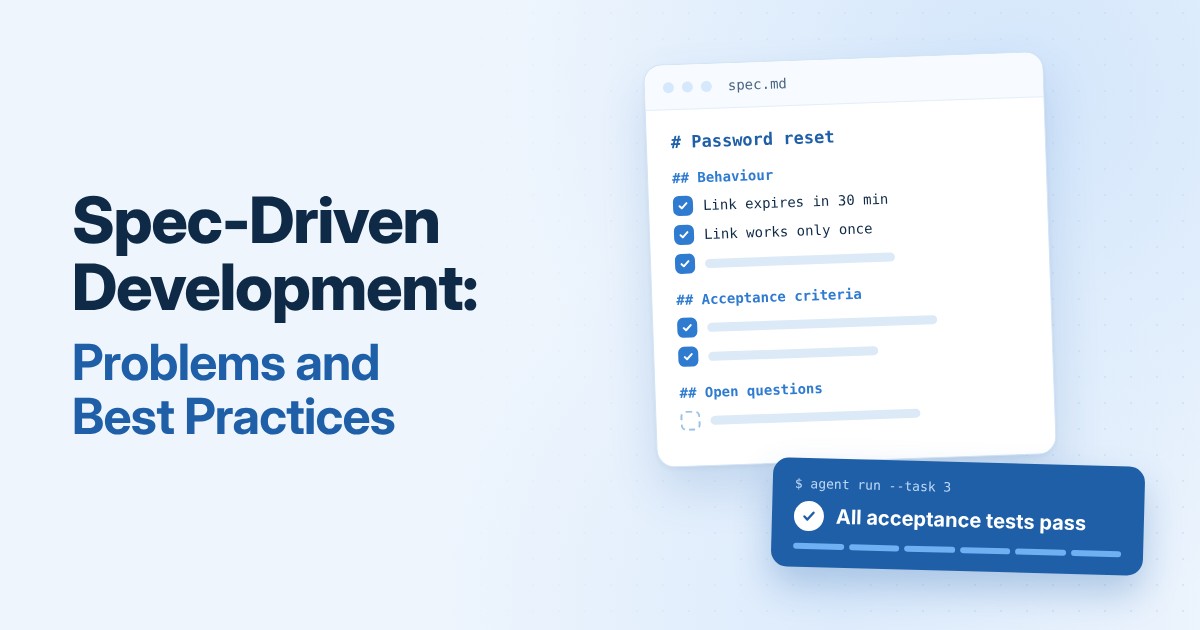
Here is a short spec for the password reset feature from our story:
# Password reset

## Behaviour
- A user enters their email on the "Forgot password" page.
- If the email exists, we send a reset link. If not, we show the same message.
- The link works once and expires after 30 minutes.
- We never send or show the old password.

## Acceptance criteria
- An expired link shows "This link has expired."
- A used link cannot be used again.
- The response time is the same for known and unknown emails.

## Open questions
- Do we log the user out of other devices after a reset?
It fits on one screen. Every line is something you can test. And the agent now knows the two rules it broke earlier: links expire, and passwords never travel by email.
Common spec-driven development problems and fixes
The same pitfalls show up again and again. The good news: each one has a simple fix.
1. Waterfall creep
The team writes the whole spec before anyone builds anything. Feedback arrives late, when changes are expensive.
Example: You spend two weeks on a 20-page spec for a new checkout. On day one of coding, you learn the payment provider does not support your refund flow.
Fix: Keep specs short. Build a thin slice early. Let the spec change as you learn.
2. Spec drift
The code changes, but the spec does not. The agent then follows old instructions.
Example: The spec says “links expire after 30 minutes.” A developer changes it to 15 in the code. Next month, the agent “fixes” it back to 30.
Fix: Update the spec in the same pull request as the code. Reviewers flag any mismatch.
3. Verbose, AI-padded specs
An AI tool writes ten pages of polite Markdown. Nobody reads it. Reviewers approve it anyway.
Example: “The system shall provide a seamless and intuitive experience for users.” This sentence takes space and says nothing you can test.
Fix: Set length limits per section. Write decisions, not prose.
4. Review overload
People review the PRD, the spec, the test plan, the task list and the code. Review becomes the bottleneck.
Example: A small feature waits three days because five documents need sign-off.
Fix: Review only at agreed gates. At each gate, review only what changed.
5. False precision
A detailed spec looks confident. But it hides assumptions that nobody tested.
Example: The spec says “search returns results in 200 ms.” Nobody checked how slow the search service is with real data.
Fix: Add two required sections: Open questions and Assumptions. Prototype the riskiest part first.
6. The agent ignores the spec
The agent skims a long spec and drifts in the middle of the task.
Example: You paste a 15-page spec and ask for the login page. The agent also “improves” the signup page.
Fix: Give the agent one small task at a time, with only the spec section it needs.
7. Context bloat
Too many documents fill the agent’s context window. The quality of its output drops.
Example: The agent gets the PRD, three old specs and the full style guide just to rename a button.
Fix: Each step reads only the files it needs.
8. One process for everything
A one-line fix goes through the full process. People start to skip the process completely.
Example: Fixing a typo on the About page needs a spec, a plan and a test plan. So developers stop using the flow.
Fix: Offer light, standard and full paths. Track how often people skip the process.
9. Duplication
The same detail lives in the PRD, the spec, the tasks and the code comments. Soon they disagree.
Example: The PRD says passwords need 8 characters. The spec says 10. The code says 12. Which one is true?
Fix: Give each fact one home. Link to it instead of copying it.
10. Over-specifying the “how”
The spec tells the engineer or agent exactly how to write the code. They often know a better way.
Example: “Use a for-loop to check each email in the list.” The spec should say “Reject duplicate emails” and stop there.
Fix: Specify behaviour, interfaces and constraints. Leave the implementation open.
11. No learning loop
The same mistakes repeat from one feature to the next.
Example: Three features in a row miss error messages for empty forms.
Fix: Hold short retros. Each retro must change at least one template, skill or checklist.
Spec-driven development best practices
The fixes above solve single problems. The habits below stop most of them from happening in the first place.
Writing the spec
- Specify behaviour, not code. Say what the system does, its interfaces and its limits. Let the engineer or agent choose how.
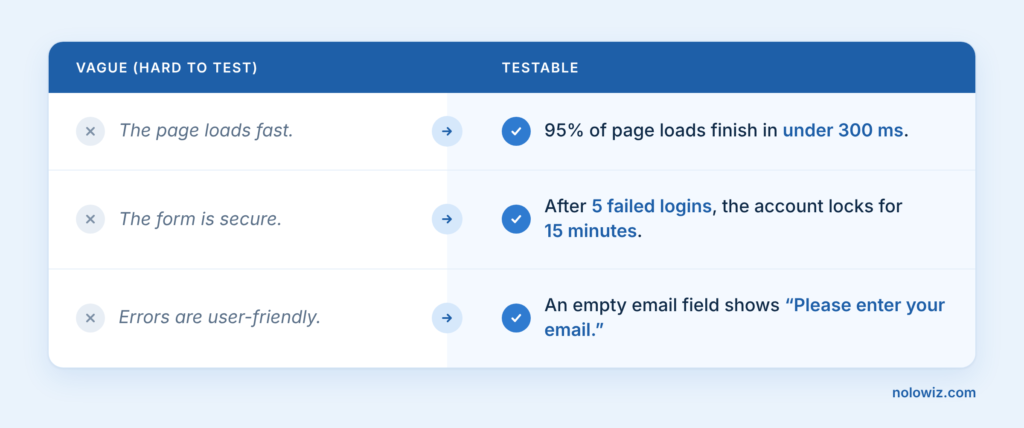
- Make every requirement testable. Each acceptance criterion maps to at least one test.
- Record decisions, not discussion. Keep a short decisions log: the choice and the reason. That beats pages of meeting notes.
- Name what you don’t know. End every spec with Open questions and Assumptions. Later steps treat assumptions as unconfirmed.
- Set length limits. For example, one page for a standard feature and three for a large one. Longer than that? Split the feature.
Here is what “testable” looks like in practice:
Working with AI agents
- Hand over one task at a time, with only the spec section that task needs.
- Write tests before code. Agree on the test plan first. Then ask the agent to make those tests pass.
- Let the agent flag gaps, not fill them. When the agent finds a hole in the spec, it writes it down and stops for a decision.
- Keep shared context in one place. Coding conventions live in one file (for example, CLAUDE.md or AGENTS.md), not in every spec.
A simple instruction for point 3: “If the spec does not cover a case, do not guess. Add it to Open questions and stop.”
Keeping specs alive
- Change the spec and the code together. A pull request that changes behaviour also updates the spec.
- Build a thin slice early. Prove the riskiest part first. Then update the spec with what you learned.
- Give each fact one home. Link between documents instead of copying.
- Review the diff, not the document. At each gate, reviewers look only at what changed since the last approval.
- Feed retros back. Every retro changes at least one template, skill or checklist.
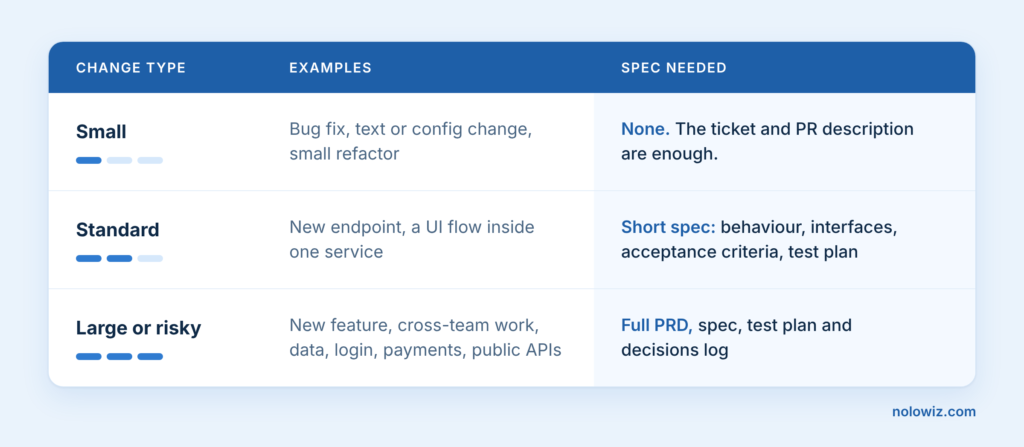
Right-size the spec to the change
Not every change needs a spec. Too little spec causes rework. Too much spec makes people skip the process.
FAQ
Is spec-driven development the same as waterfall?
No. Waterfall writes everything up front and rarely goes back. Spec-driven development keeps the spec short and updates it as you build. The spec is a living contract, not a one-time document.
Do I need a spec for every change?
No. A bug fix or a text change needs only a clear ticket. Save full specs for large or risky work, such as payments, login or public APIs.
How long should a spec be?
About one page for a standard feature. Up to three pages for a large one. If it gets longer, split the feature into smaller parts.
Why do AI coding agents ignore long specs?
An agent has a limited context window. When you give it too much text, the important rules get lost. Give it one task and only the spec section that task needs.
What tools support spec-driven development?
GitHub Spec Kit and Kiro are two popular options. But you can start with a plain Markdown file in your repo. The habits matter more than the tool.
Final thoughts
Spec-driven development is not about writing more documents. It is about writing the right few lines, so that people and AI agents build the same thing.
Start small. Pick your next standard feature. Write a one-page spec with testable acceptance criteria and an Open questions section. Hand it to your agent one task at a time, and see what changes.