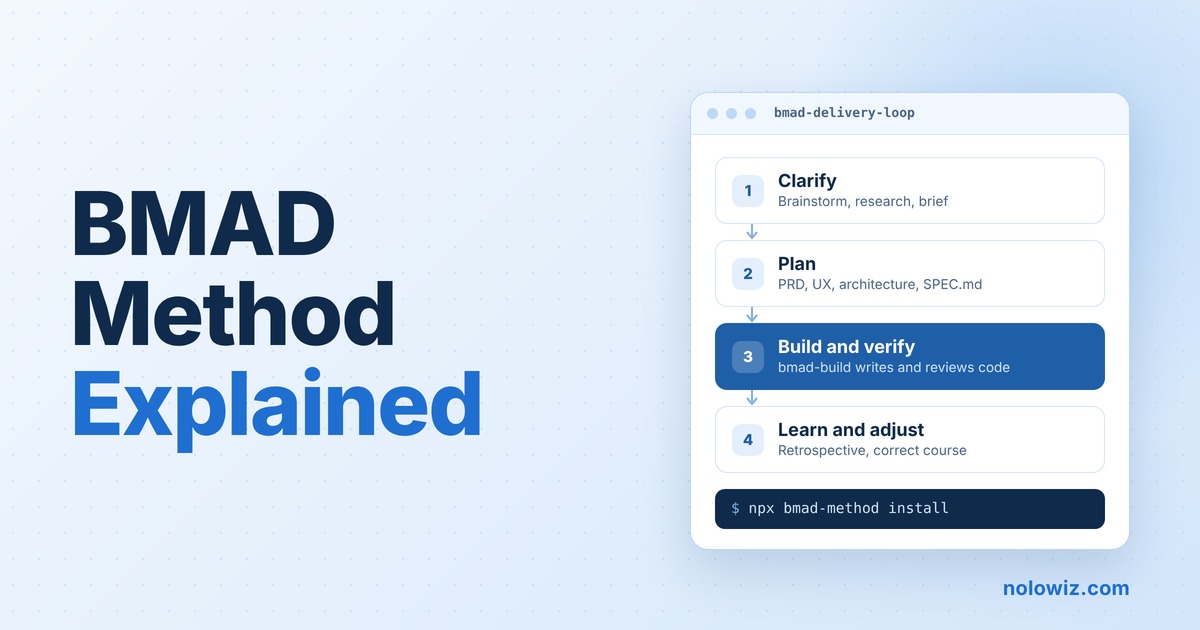
AI coding assistants write code fast. But they often guess what you want, and they forget earlier decisions when a new chat starts. The result is code that works today and breaks the plan tomorrow.
The BMAD Method tries to fix this problem. It gives your AI coding tool a set of skills that act like an agile team: an analyst, a product manager, an architect, a developer and a reviewer. Each skill writes a document, and the next skill reads it. Your decisions stay on record, so the AI does not have to guess. BMAD is free and open source, and it has more than 54,000 stars on GitHub.
In this guide, we explain what BMAD is, how it works, what changed in recent versions, and how to install it. We also tell you who should use it and who can skip it.
What Is the BMAD Method?
BMAD stands for Breakthrough Method for Agile AI-Driven Development. It is a framework that adds structure to AI-assisted software work, from the first idea to reviewed code.
- Free and open source: BMAD uses the MIT license. Its makers say there are no paid workflows and no closed community.
- Owner: BMad Code, LLC owns the “BMad” and “BMAD-METHOD” trademarks.
- Popularity: The official GitHub repository has about 54,600 stars and 6,100 forks (checked on November 10, 2026).
- Where it runs: BMAD works inside AI coding tools that support skills, such as Claude Code, Cursor and Codex. Version 6.5 raised the number of supported platforms to 42.
In simple words: BMAD is not a new AI model. It is a set of instructions, templates and scripts. These tell your existing AI tool how to plan, build and check work step by step.
Why BMAD Exists
The BMAD team says coding assistants are good at writing code, but they often turn unstated assumptions into code. BMAD makes those assumptions visible before the AI writes code.
The method has three main ideas:
- Right-sized process. A small, clear change goes directly to build. A large or risky project gets more planning first.
- Durable context. Product and technical decisions go into files, such as a PRD, a spec or an architecture document. The AI reads these files in each new session, so you do not explain the same thing again.
- Human control. The AI asks questions and shows a plan. You approve it before it writes code.
This is also called spec-driven development: you write the spec first, then the AI builds against it. Read about spec driven development problems and best practices.
How BMAD Works
BMAD sizes the process to the work. You can start at any stage, based on how clear your idea is.
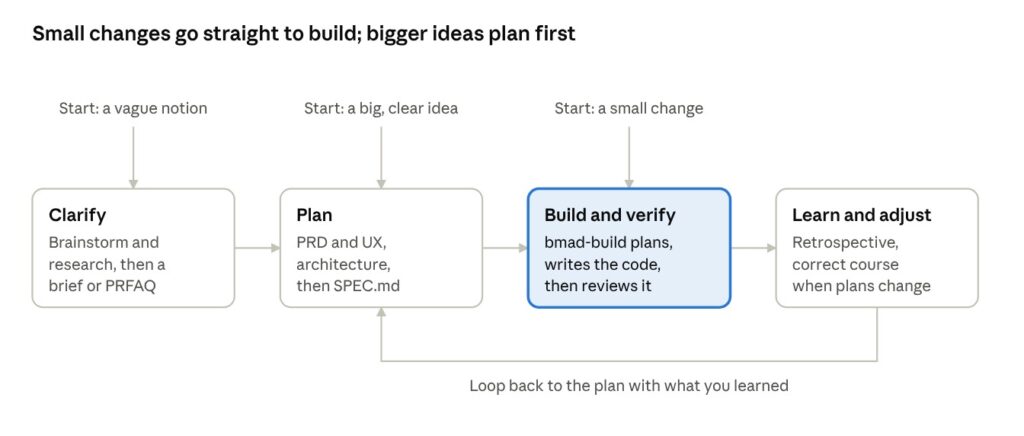
A small, clear change goes directly to Build. A big but clear idea starts at Plan. A vague notion starts at Clarify. After a build, you learn from the result and loop back to the plan.
The official docs give a simple rule for how much planning to do:
- Trivial or one-session work: run
bmad-builddirectly. It asks questions, shows a plan for your approval, writes the code and checks its work. - Epic-sized work (one outcome, several sessions): write a spec with
bmad-spec, break it into stories, then build each story. - Project-sized work (several epics, or about 20 or more sessions): use the full flow with a PRD, UX design, architecture, epics and sprint planning.
The docs also say size is only one signal. Use more planning when the work has high risk, unclear requirements or effects on other systems.
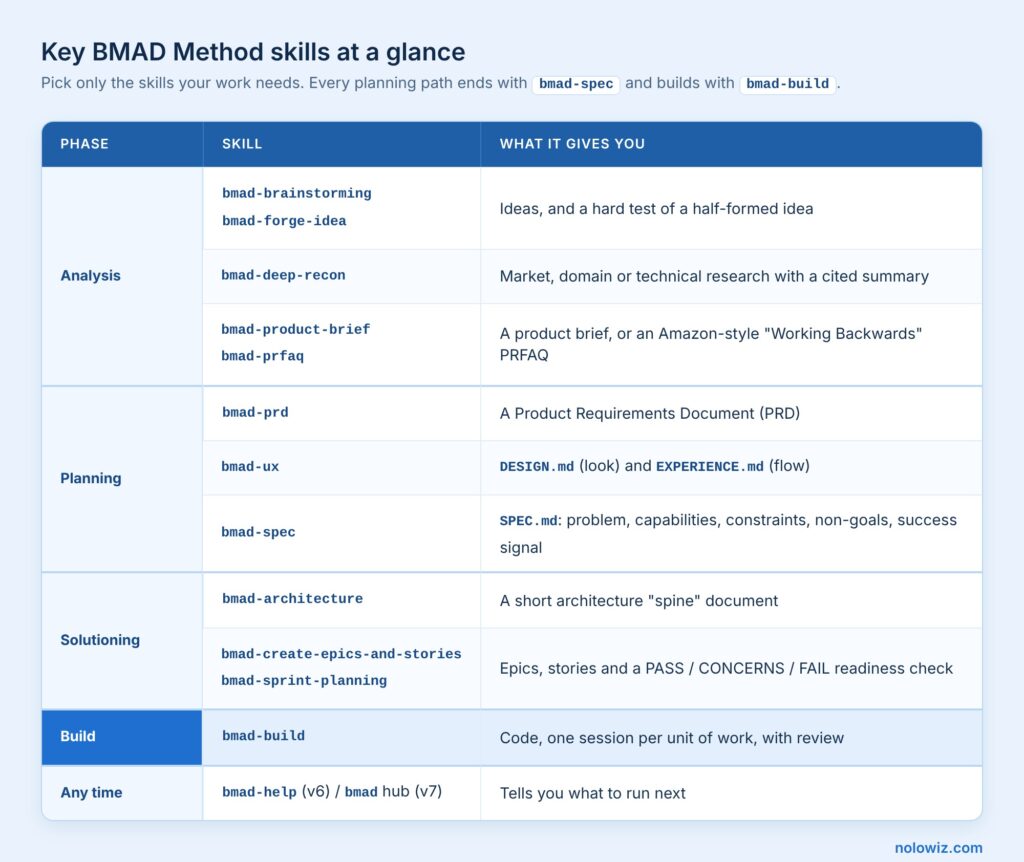
Key BMAD Skills at a Glance
BMAD groups its planning skills into three phases. You pick only the skills your work needs. Every planning path ends with bmad-spec, and every path builds with bmad-build.
How to Install BMAD
You need Node.js 20.12 or later, Python 3.10 or later, and uv. Open a terminal in your project folder and run:
npx bmad-method installThen open the project in your AI coding tool. Call bmad-build with the change you want. Run bmad-help when you are not sure what to do next.
Pros, Cons and Who Should Use It
Pros
- Decisions stay in files, so the AI keeps context across sessions.
- The process scales: a bug fix stays light, a large product gets full planning.
- It works on new projects and on existing codebases.
- It is free, open source and has an active community on GitHub and Discord.
Cons
- It produces more documents than lightweight agile. Some critics say heavy specs up front can slow the response to changing requirements (Charter Global).
- It changes fast. Skills were renamed and merged in v6.11, and v7 will bring more breaking changes.
- It needs setup: Node.js, Python, uv and a skills-ready AI coding tool.
Use BMAD if you build products with AI agents and lose time when the AI forgets past decisions. It also helps teams that need written plans for review.
Skip BMAD if you only make small, one-off scripts. A plain AI coding tool is faster for that.
Conclusion
BMAD turns an AI coding tool into a small, disciplined team. It asks questions first, writes the decisions down, and then builds and reviews the code.